<?xml version="1.0" encoding="utf-8"?><feed xmlns="http://www.w3.org/2005/Atom" ><generator uri="https://jekyllrb.com/" version="4.4.1">Jekyll</generator><link href="https://leziak.com/feed.xml" rel="self" type="application/atom+xml" /><link href="https://leziak.com/" rel="alternate" type="text/html" /><updated>2026-02-16T11:24:03+01:00</updated><id>https://leziak.com/feed.xml</id><title type="html">Leziak.com</title><subtitle>Articles about technology, photography, art, writing and games</subtitle><author><name>Kamil Leziak</name></author><entry><title type="html">Quest for a perfect keyboard</title><link href="https://leziak.com/quest-perfect-keyboard/" rel="alternate" type="text/html" title="Quest for a perfect keyboard" /><published>2026-02-10T13:38:50+01:00</published><updated>2026-02-10T13:38:50+01:00</updated><id>https://leziak.com/quest-perfect-keyboard</id><content type="html" xml:base="https://leziak.com/quest-perfect-keyboard/"><![CDATA[<p>I like keyboards.</p>

<p>For most people keyboards are merely input devices, not worth second thought. And they are right. In most cases people do not need to worry too much about a keyboard. Keyboards are ubiquitous, standardised, straightforward to use. They are provided in every workspace and even the simplest, cheapest one <em>gets the job done</em>. Why one would try to improve something that is good enough? <!--more--></p>

<p>Well, sometimes good enough is not good enough for every task, and some people could benefit from upgrading certain pieces of hardware they use on a daily basis. It is hardly needed to upgrade a keyboard for a person who uses their desk only occasionally, maybe writing a few emails. But if your job requires long hours of staring at computer screen <em>and writing significant amount of text</em>, a generic keyboard might not be the most optimal solution in terms of both ergonomics and productivity.</p>

<p>Choosing a keyboard is a matter of personal preference. As far as I have observed, there are two camps: people who do not care about the keyboard they use and people who <em>obsess</em> about every detail of their keyboard, trying to find the perfect tool for their use case, the holy grail of input devices. I do not think I need to tell you which camp I belong to.</p>

<h2 id="the-beginnings">The beginnings</h2>
<p>In early 2010s, when I was still a Windows user, I was using a cheap wireless keyboard with a backlight. I needed the backlight, so I prioritised that over other specs, and bought one of the cheapest keyboards that still offered a backlight. It turned out to be a mistake. The rubber membrane in that keyboard was terrible. It gave a spongy, inconsistent feedback and physically hurt my fingers after a prolonged typing session. After only a couple of months (which, from time perspective, was already too long) I bought a wired, backlight keyboard, which was a bit pricier. The new keyboard also had membrane keys, but offered significantly improved typing experience. I had been using that keyboard with my PC for several years. It was my main input device until January 2015, when I bought my first Macintosh computers: a Mac Mini and MacBook Air.</p>

<p>Switching to Apple ecosystem was a big deal, in a positive way. I finally saw that some things can be done differently, easier and more convenient for the user. A good example is the location of <code class="language-plaintext highlighter-rouge">⌘</code> key, which is closer to the space bar and allows for more streamlined use of some keyboard shortcuts. The quality of keyboards was also better, both the built-in one in MacBook Air and Apple Magic Keyboard for Mac Mini. I liked them a lot, they were yet another step up from the wired membrane keyboard I had been using with my PC for some time. Now, that Mac computers became my main work machines, the PC had been delegated solely to gaming (I used Parallels Desktop on MacBook Air when I had to open some Windows-specific programme). The membrane PC keyboard was used only when exploring the Wastleland in <a href="../tags/fallout4">Fallout 4</a> or fighting dragons in Skyrim, etc.</p>

<p>I was a happy user of stock Apple keyboards for four years, when I finally decided to buy my first mechanical keyboard. I had been aware of their existence for quite some time. I studied differences between <a href="https://www.penaddict.com/blog/2020/3/11/a-brief-introduction-to-mechanical-keyboard-switches">colours of the switches</a> and even before I had a chance to try out a mechanical keyboard, I had already known my switch preferences<sup id="fnref:fn1"><a href="#fn:fn1" class="footnote" rel="footnote" role="doc-noteref">1</a></sup>. My first mechanical keyboard was Das Keyboard Model S Professional for Mac.</p>

<p>Finding the right mechanical keyboard turned out to be much more difficult than I had anticipated. Two factors were <em>severely</em> limiting my options. Firstly, I wanted a keyboard with a Mac-specific layout, with keys like <code class="language-plaintext highlighter-rouge">⌘</code>, <code class="language-plaintext highlighter-rouge">⌥</code>, <code class="language-plaintext highlighter-rouge">∧</code> instead of <code class="language-plaintext highlighter-rouge">Win</code>, <code class="language-plaintext highlighter-rouge">Ctrl</code> and <code class="language-plaintext highlighter-rouge">Alt</code>. That of itself shrank my choices by 2/3 or more. Turns out, there are many producers of mechanical keyboards that focus solely on Windows segment of the market, mostly for gaming or office use. While you have a fairly big choice of switches or sizes of the keyboard, when it comes to Mac-specific layouts, your options are few and far between.</p>

<p>The second factor was that I required a keyboard with the <a href="https://en.wikipedia.org/wiki/ISO/IEC_9995">ISO layout</a> (basically, a keyboard where <code class="language-plaintext highlighter-rouge">↩</code> key is in the shape of an inverted L). ISO is a standard for international keyboards but most of the world had adopted the ANSI layout (where <code class="language-plaintext highlighter-rouge">↩</code> key is in a shape of horizontal rectangle) as seen in the USA. When buying Das Keyboard, I opted for ANSI version, which was a big compromise because there was no ISO version with Mac-specific keys available. It worked flawlessly and my joy of writing to the clicky melody of blue switches was immense. Yet when I switched from Mac Mini (where I used the mechanical keyboard) to my MacBook Air, the layout was different, so for the first few minutes I kept hitting wrong keys when trying to advance to the next line with Enter. It was not a dealbreaker, but it introduced unwanted friction in my workflow. Additionally, the keyboard lacked backlight and lettering on the keys started to wear down pretty quickly, after only a couple of months, which was a bit disturbing.</p>

<p>After yet another couple of years I came by discussion of mechanical keyboards on the internet and I saw the name “Keychron” for the first time. It was a brand I did not consider when I was buying my first mechanical keyboard. I searched their website and, to my surprise, I found numerous mechanical keyboards available with Mac-specific keys <em>and</em> the ISO layout. And those keyboards had configurable backlight and worked wirelessly! ‘I finally found keyboard heaven’ I told myself. I ordered my new mechanical keyboard in December 2023 and it arrived just in time for Christmas.</p>

<h2 id="the-perfect-keyboard-">The perfect keyboard (?)</h2>
<p>For the last three years I have been a proud owner of <strong>Keychron Q3 Pro Special Edition</strong>. It is a marvellous keyboard in every way. It can pair to up to three devices, so I can use it with a MacBook, Mac Mini and an iPad. It is near perfect. From time perspective, I wish I had opted for another model, with a numeric pad (as a scientist, I find it really useful). On the other hand, the ten-key-less version that I have already weights well over 2 kilograms<sup id="fnref:fn2"><a href="#fn:fn2" class="footnote" rel="footnote" role="doc-noteref">2</a></sup>.</p>

<p>Another thing that I used to regret is, that the keycaps are made with ABS plastic, which is supposedly less durable (and turns glossy faster under the oils from one’s hands) than a double-cast PBT keycaps found in other models. On the other hand, with double-cast PBT keycaps there would be no shine-through for lettering, which greatly improves readability in the dark or in dim light conditions.</p>

<p>The last remaining thing that still makes me think about an improvement is the type of switches installed in the keyboard. Unfortunately, the model I wanted was not available with the clicky type of switches I enjoyed in Das Keyboard. Instead it uses Keychron Banana switches, which are tactile but not clicky. I got used to them through all those years, but since the keyboard is hot-swappable (which means I can replace switches easily, without any soldering), I am considering replacing them with the second generation of Cherry MX Blue switches. In theory, it would gave me the best of both worlds: the clicky feedback I know from Das Keyboard and the good old ISO layout of Keychron.</p>

<h2 id="the-globe-key">The Globe key</h2>
<p>Unfortunately, things got even <em>more</em> complicated by the fact that Apple introduced Globe key into their system shortcuts on both macOS and iPadOS. The <code class="language-plaintext highlighter-rouge">Globe key</code> is especially heavily used in iPadOS, which makes my workflow inconsistent. On some days I only work with an iPad and on others I use my MacBook. There are certain keyboard shortcuts that are identical, but there is a lot of shortcuts that are iPad-specific, and if I want to be fairly productive with that device, I should try to use them. The issue is, only proprietary Apple keyboards have the <code class="language-plaintext highlighter-rouge">Globe key</code>.</p>

<p>There is no easy way of remapping the <code class="language-plaintext highlighter-rouge">Globe key</code> to another key with QMK/VIA, so the only remaining option is to remap it using iPad keyboard settings. Alas, Apple limits one’s ability to remap keys, and <code class="language-plaintext highlighter-rouge">Globe key</code> can only be alternatively represented by either <code class="language-plaintext highlighter-rouge">⌘</code>, <code class="language-plaintext highlighter-rouge">⌥</code>, <code class="language-plaintext highlighter-rouge">∧</code> or <code class="language-plaintext highlighter-rouge">Caps Lock</code>. Since the first three are essential for <em>other</em> shortcuts on iPadOS, if one wants to use the <code class="language-plaintext highlighter-rouge">Globe key</code>, they need to sacrifice their use of <code class="language-plaintext highlighter-rouge">Caps Lock</code>. There is a workaround to remap <em>another</em> key to <code class="language-plaintext highlighter-rouge">Caps Lock</code>  with QMK/VIA (which, on the contrary to remapping the <code class="language-plaintext highlighter-rouge">Globe key</code>, <em>can</em> be done) but then things start to get out of hand…</p>

<h2 id="apple-magic-keyboard">Apple Magic Keyboard</h2>
<p>Recently, I bought a new model of <strong>Apple Magic Keyboard with Touch ID and Numeric Keypad</strong>. I did it as an experiment of sorts, to see if switching from a mechanical keyboard with great typing experience but no numeric pad, no Touch ID and no <code class="language-plaintext highlighter-rouge">Globe key</code>, to a membrane keyboard with numeric pad, Touch ID and a <code class="language-plaintext highlighter-rouge">Globe key</code> will actually be a downgrade or upgrade. The results are mixed and inconclusive.</p>

<p>One of the biggest advantages of the Apple Magic Keyboard is the implementation of Touch ID, which works beautifully with my new MacBook Pro. Since my laptop usually resides on an arm mount, it is at the far end of my reach when I need to use its Touch ID button to authenticate myself. Apple Magic Keyboard removes this obstacle, but sadly only for a MacBook. My iPad Pro, although using a newer M5 chip, cannot take advantage of the Touch ID button and still prompts me to use Face ID. I find it cumbersome, as my iPad is on a stand to the right of my screen and laptop arm, and to use Face ID I need to turn my head about 70 degrees to the right. I suppose it is a limitation of iPadOS rather than a hardware issue.</p>

<p>The <code class="language-plaintext highlighter-rouge">Globe key</code> also proved to be useful when working on my iPad, allowing me to use the full suite of shortcuts designed for this operating system. I especially use the <code class="language-plaintext highlighter-rouge">Globe key</code> + <code class="language-plaintext highlighter-rouge">`</code> shortcut to switch active apps in Stage Manager. Additional function keys <code class="language-plaintext highlighter-rouge">F13</code> to <code class="language-plaintext highlighter-rouge">F19</code> are helpful when I need to quickly launch one of predefined programmes or a custom shortcut in the Shortcuts programme. In this category Apple Magic Keyboard is a clear winner.</p>

<p>Regarding the downsides, the typing experience comes to mind. Apple Magic Keyboard has much smaller key travel than a mechanical keyboard, additionally the keycaps are completely flat, which is not the optimal solution in terms of ergonomics. However, I have noticed that I can actually type a bit faster on this subjectively worse keyboard, due to its low profile and fairy big, evenly-spaced keys. It does not mean that I <em>prefer</em> this keyboard, but it does mean that I am marginally <em>quicker</em> with it. In terms of error rate, I guess it is similar on both keyboards. I have never been a touch-typist, nor did I pay particular attention to words per minute or other metrics. My output is nearly always limited by the speed at which I compose my thoughts anyway. It is hard to imagine a scenario in which I would need the extra speed, and I do not think that my productivity gain with Apple Magic Keyboard is bigger than maybe a minute or two per day. Still, it is a food for thoughts.</p>

<p>Some people would also notice that Apple Magic Keyboard has no backlight. For me personally, it is not a factor anymore. I use my keyboard at work, where I have a big window and very good lighting, so there is no need for me to use keyboard internal LEDs at all. I have even turned off the built-in light in my Keychron keyboard to conserve the battery and because in a well-lit room it was not nearly as impressive as it would be in a dark gaming den (speaking of gaming, I eventually replaced the membrane keyboard at my PC with a mechanical Razer Huntsman Elite which has linear, yellow switches).</p>

<p><img src="../images/keychron_q3_pro_apple_magic_keyboard.jpeg" alt="keychron-q3-pro-apple-magic-keyboard" />
<em>My two contestants in the quest for a perfect keyboard: Keychron Q3 Pro Special Edition (top) and Apple Magic Keyboard with Touch ID and USB-C connection (bottom). Both work awesomely and offer great yet distinctive typing feedback.</em></p>

<h2 id="the-final-showdown">The final showdown</h2>
<p>To further aid my decision regarding the keyboard, I ordered the second generation of Cherry MX Blue switches and I have replaced them in Keychron Q3 Pro keyboard, to see how using my preferred switches would improve the typing experience. Although the whole operation took about an hour (it was the first time I was swapping switches on a mechanical keyboard), after a short while I can say that it was totally worth it.</p>

<p>The clicky feedback helps with discerning any accidental double-tapping and I also like the fact that both the initial <em>depression</em> and the <em>actuation</em> forces for Cherry MX Blue switches are a bit lower than for Keychron Banana. With Banana switches I had to press a key harder due to the fact that the tactile bump was at the very beginning of key travel. With Cherry MX Blue switches the tactile click is more or less mid-way, so the initial resistance when pressing a key is lower.</p>

<p>Keychron keyboard with Cherry MX Blue switches is definitely an improvement. However, I cannot overlook the fact that Apple Magic Keyboard has yet another ace in its metaphorical sleeve: tight integration with macOS and iPadOS, especially in terms of Apple-specific function keys. The new <code class="language-plaintext highlighter-rouge">Globe key</code> is one example, but first-party keyboards also allow for easy use of the Spotlight search and active windows view while pressing <code class="language-plaintext highlighter-rouge">F4</code> or <code class="language-plaintext highlighter-rouge">F3</code>, respectively. While it is easy to configure those keys on Keychron to work in the same way on macOS, it appears that this is not the case for iPadOS. I cannot seem to be able to invoke active windows view by pressing <code class="language-plaintext highlighter-rouge">F3</code> on Keychron keyboard while it is connected to iPad. Both Apple Magic Keyboard with Touch ID and the Magic Keyboard for iPad have a functional Spotlight and active windows view under <code class="language-plaintext highlighter-rouge">F4</code> and <code class="language-plaintext highlighter-rouge">F3</code> keys on iPadOS. It is not a deal-breaker, but yet another small annoyance that adds to friction while using a Keychron keyboard.</p>

<p>Since both Apple Magic Keyboard and Keychron Q3 Pro are very good keyboards, and each of them stands out in its own right, I decided to <strong>keep them both</strong>, with a <em>slight</em> preference towards Apple Magic Keyboard. I am using Apple Magic Keyboard with Touch ID for the time being, although I cannot promise that I will not return to Keychron one day. At this moment, Apple’s Magic Keyboard first-party functionality is more important for my overall productivity and frictionless workflow than Keychron’s better typing feedback.</p>

<p>It is a surprising conclusion for me. I had originally expected that the perfect typing experience of Keychron with Cherry MX Blue switches would be the deciding factor but reality proved otherwise. Those two weeks were by far the most exhaustive testing of keyboards I have ever performed. If, even after two weeks, I cannot name a clear winner, it means that both keyboards are equally well-suited for the task.</p>

<p><em>This is article no. 18 from the <a href="../tags/100daystooffload/">100 Days to Offload</a> series.</em></p>

<div class="footnotes" role="doc-endnotes">
  <ol>
    <li id="fn:fn1">
      <p>I adore the sound of clicky Cherry MX Blue switches <a href="#fnref:fn1" class="reversefootnote" role="doc-backlink">&#8617;</a></p>
    </li>
    <li id="fn:fn2">
      <p>high weight is deliberate, as to make the keyboard stable and less prone to sliding; it is an annoyance, however, when I need to move the keyboard to lay some papers on the desk <a href="#fnref:fn2" class="reversefootnote" role="doc-backlink">&#8617;</a></p>
    </li>
  </ol>
</div>]]></content><author><name>Kamil Leziak</name></author><category term="writing" /><category term="technology" /><category term="writing" /><category term="hardware" /><category term="keyboard" /><category term="technical" /><summary type="html"><![CDATA[I like keyboards. For most people keyboards are merely input devices, not worth second thought. And they are right. In most cases people do not need to worry too much about a keyboard. Keyboards are ubiquitous, standardised, straightforward to use. They are provided in every workspace and even the simplest, cheapest one gets the job done. Why one would try to improve something that is good enough?]]></summary><media:thumbnail xmlns:media="http://search.yahoo.com/mrss/" url="https://leziak.com/images/keychron_q3_pro_apple_magic_keyboard.jpeg" /><media:content medium="image" url="https://leziak.com/images/keychron_q3_pro_apple_magic_keyboard.jpeg" xmlns:media="http://search.yahoo.com/mrss/" /></entry><entry><title type="html">Tinkering with emacs</title><link href="https://leziak.com/tinkering-emacs/" rel="alternate" type="text/html" title="Tinkering with emacs" /><published>2026-01-25T15:17:58+01:00</published><updated>2026-01-25T15:17:58+01:00</updated><id>https://leziak.com/tinkering-emacs</id><content type="html" xml:base="https://leziak.com/tinkering-emacs/"><![CDATA[<p>Recently I have switched to a different computer and, as a result, my entire Jekyll installation had to be migrated. During that process I decided to try out a new way of creating articles for my blog: with emacs. <!--more--> Emacs is a highly customisable text editor available for all major operating systems. It has impressive history, starting in 1976. However, its unique behaviour and conventions (most of them <em>preceding</em> standards we take for granted nowadays) contribute to a steep learning curve, which can be discouraging for new users.</p>

<p>The idea to try emacs out can be credited to Matt Gemmell, whose <a href="https://mattgemmell.com/emacs/">article on the topic</a> turned out to be pivotal in my discovery of this potent tool. Matt is a Scottish author and a former developer, offering precious insights into some curious and powerful workflows. I wholeheartedly recommend you to visit his <a href="https://mattgemmell.com/blog/">blog</a>, if you haven’t already.</p>

<p>For the last couple of years I had been using <a href="https://www.barebones.com/products/bbedit/">BBEdit</a> as my text editor of choice. It is an excellent, feature-rich programme, allowing for a comfortable work with Graphical User Interface (GUI) and a pointing device (e.g. mouse, trackball or touchpad) as a main way of navigation. It is also a programme of an old provenience, although not as impressively old as emacs. I really cannot say anything negative about BBEdit: it fits my workflow perfectly, not only in regard to maintaining a personal website, but also in everyday operations on text or data files. I should note that my curiosity about emacs is not rooted in dissatisfaction with BBEdit. I just want to experiment with a solution of another kind to see if a terminal-based text editor can be of use for me.</p>

<p>Since these are my beginnings with emacs, I do not want to formulate any opinion on this piece of software quite yet. It deserves a longer and more intentional use in various situations. I intend to publish updates on my little experiment along the road.</p>

<p><em>This is article no. 17 from the <a href="../tags/100daystooffload/">100 Days to Offload</a> series.</em></p>]]></content><author><name>Kamil Leziak</name></author><category term="writing" /><category term="technology" /><category term="emacs" /><category term="terminal" /><category term="text" /><category term="website" /><category term="technical" /><category term="software" /><summary type="html"><![CDATA[Recently I have switched to a different computer and, as a result, my entire Jekyll installation had to be migrated. During that process I decided to try out a new way of creating articles for my blog: with emacs.]]></summary></entry><entry><title type="html">Affinity creative programmes merge into one</title><link href="https://leziak.com/affinity-canva/" rel="alternate" type="text/html" title="Affinity creative programmes merge into one" /><published>2025-11-07T16:45:51+01:00</published><updated>2025-11-07T16:45:51+01:00</updated><id>https://leziak.com/affinity-canva-app</id><content type="html" xml:base="https://leziak.com/affinity-canva/"><![CDATA[<p>Just before the end of October big news rippled across the creative industry. A trio of creative programmes, previously made by Serif (who some time ago were acquired by Canva), known as Affinity Photo, Design and Publisher, have been merged into one piece of software, from now on known simply as “Affinity”. The news brought some apparently positive changes, namely the new Affinity software being available free of charge. In my opinion it is not, however, a good thing. It is not a good thing at all. <!--more--></p>

<p>If you have any, even marginal knowledge about modern technology world, then you obviously know that there is no such thing as a free piece of software coming from a commercial company. There are many awesome open source projects, which are truly free, but they usually have been maintained from the start by a team of volunteers or a non-profit organisation. Affinity software has always been for profit, similar to Adobe Creative Suite, although Affinity software was available as a one-time purchase instead of a subscription system (which I wholeheartedly believe is a cancer of a modern technology world).</p>

<p>The change of Affinity business model raises a question: what now? How Canva actually <em>monetises</em> this new all-in-one Affinity? One of the obvious ways is by a subscription, which is required to unlock some of tools in the new Affinity, namely mostly functions using AI algorithms. Nevertheless, even if one is not planning to use any of AI functions, a Canva account is now required to actually use the new programme. This move, while allowing Canva to gather data on users of its software, is deeply disturbing for many reasons.</p>

<p>First of all, there is a risk that Canva may use users’ content to train their AI algorithms. This by itself is utterly unacceptable for many people who are more aware of the privacy and copyright concerns regarding feeding some data to Large Language Models and other Artificial Intelligence tools. Secondly, there is a matter of protecting users’ data and telemetry gathered by the software itself. I do not want <em>any</em> data related to my use of software, or to my hardware, to be sent to a server located in a country with poor privacy laws, like USA.</p>

<p>There were two major versions of Affinity programmes, original and V2. When V2 came out the further development of original versions ceased and the situation with the new single Affinity programme is identical. V2, released a couple of years ago and updated up to a couple of weeks ago is now effectively abandoned in favour of the new, shiny, AI-loaded software. V2 will only keep working as long as the software is not broken by some bugs caused by updates of the operating system and its components. It may take years, months or weeks for something like this to happen, and when, not if, it does, users of previous generation of Affinity programmes will be stranded, facing a dilemma: move on to the new app, risking some privacy concerns, among other things, or choose some another software entirely. I have to say that such a decision can only deepen one’s annoyance, since many long-time Affinity users originally migrated to this software after being fed up with Adobe and its efforts for closing up their ecosystem. Now the new all-in-one Affinity programme allows for transfer of project files from previous versions, but it is a one way operation. Once user upgrades their projects to this new programme, files will no longer be compatible with Affinity V2. The new Affinity app uses a new proprietary file format which cannot be accessed by the older apps, nor by any other app. This means that people who decide to move to the new programme will be locked in. In a way it is going to be a worse situation than with Adobe subscription, because Adobe file formats can at least be opened by third party software (I am aware that there may be some compatibility issues, but there is such a possibility at least). New Affinity files can only be opened in the new shiny app, and let us remember that to use that app one has to create a Canva account and accept their Terms of Service.</p>

<p>One way or another, Canva will get their pound of flesh from users of the new Affinity app. It may come in the form of data gathering, using users’ content to train AI algorithms, selling users’ data or performing targeted advertisement, but it <em>will</em> happen. Honestly, I am a little (well, more than a little) surprised by all those comments by various technology-focused bloggers and users of various social media platforms, overfilled with excitement for the prospect of a new integrated app, overlooking consequences for their privacy and for the future of Affinity itself. It’s as if some people forgot that when the product is free, <em>they</em> are the product. And no amount of advertisement and babbling coming from Affinity developers is going to change that.</p>

<p>A decade ago <a href="../moving-from-photoshop-to-affinity-photo/">I left Adobe Photoshop in favour of Affinity Photo</a>. Now it looks like I may need to change my photo-editing programme of choice once more. I still have a working V2 version of Affinity Photo, Affinity Designer and Affinity Publisher, and I plan to use them as long as they are usable and safe to use (there will be no more security fixes, among other things, similarly to Windows 10 end of support by Microsoft). But I will not switch to the new Affinity app, not even when it’s “free”, which is a lie. I am not willing to pay for it with my data and I have zero interest in Canva, AI-features or freemium software. I am willing to pay a significant price for a lifetime access to a piece of software that does not spy on me or use my data to feed insatiable AI models.</p>

<p>In the digital world where privacy means so little to so many, I stand against the enshittification of the internet and software. Wherever I have a choice to protect my data or keep even small part of my digital assets away from AI and ad-targeting algorithms, I will always support developers and projects that respect their users and their right to privacy. Affinity no longer does that.</p>

<p><em>This is article no. 16 from the <a href="../tags/100daystooffload/">100 Days To Offload</a> series.</em></p>]]></content><author><name>Kamil Leziak</name></author><category term="technology" /><category term="serif" /><category term="affinity" /><category term="canva" /><category term="ai" /><summary type="html"><![CDATA[Just before the end of October big news rippled across the creative industry. A trio of creative programmes, previously made by Serif (who some time ago were acquired by Canva), known as Affinity Photo, Design and Publisher, have been merged into one piece of software, from now on known simply as “Affinity”. The news brought some apparently positive changes, namely the new Affinity software being available free of charge. In my opinion it is not, however, a good thing. It is not a good thing at all.]]></summary></entry><entry><title type="html">Far Harbor in Fallout 4: a tragic story of conflict</title><link href="https://leziak.com/fallout-4-far-harbor/" rel="alternate" type="text/html" title="Far Harbor in Fallout 4: a tragic story of conflict" /><published>2025-07-22T09:44:11+02:00</published><updated>2025-07-22T09:44:11+02:00</updated><id>https://leziak.com/fallout-4-far-harbor</id><content type="html" xml:base="https://leziak.com/fallout-4-far-harbor/"><![CDATA[<p>Although I played the entire story of Fallout 4 in 2016, when the game was released (I sided with the Institute back then), I have never really explored the questlines related to Fallout DLCs. In 2024 I finished the story of the Mechanist and her murderous robots, now the time has come to visit Far Harbor. <!--more--></p>

<p>I had the initial quest, to visit the Nakano residence for quite a long time. I even tried to reach it way earlier in the game, which was not a good idea, considering I play in the Survival Mode. I got wrecked by feral ghouls and supermutants inhabiting abandoned ruins alog the northern shore. It brought a lot of frustration. That is why I decided to get back to this quest after I am done with the questline for Automatron DLC. I figured that at that time my level would be high enough to give me some opportunity to actually fight back the creatures standing between me and Far Harbor. This tactic proved to be successful and one fine day I took the boat to Far Harbor for the first time.</p>

<p>I had virtually zero knowledge of Far Harbor, its questline, locations and specifics, which allowed me to genuinely experience this DLC for the first time. I was surprised how gloomy, depressing and dangerous (especially for local people) that place actually was. The everpresent fog, along with the creatures hiding within, made all harbormen and women staying in a state of constant alert, with pesimistic view of the future.</p>

<p><img src="../images/fallout4_far_harbor_daytime_fog.jpg" alt="far-harbor1" />
<em>Far Harbor island is a bleak place during the daytime, with thick fog obscuring the view and providing a hiding place for monsters and bandits.</em></p>

<p>The main plot revolves about conflict between three groups dwelling on the island. First one consists of the residents of eponymous settlement perched at the shore of the island. They try to survive almost regular attacks of various creatures hiding within the fog, although their settlement is safer now, that they have working fog condensers, keeping the fog at bay. By the way, I cannot omit the fact that the name of devices is misleading. Since the fog is water that <em>has already condensed</em>, i.e. it is in a liquid form, the condensers don’t actually condense anything. They can, at most, collect or absorb droplets of water that the fog is made from, but that has nothing to do with condensation.</p>

<p><img src="../images/fallout4_far_harbor_settlement.jpg" alt="far-harbor2" />
<em>Fog condensers play a vital role in protecting the biggest human settlement from creatures emerging from the fog. They also aid lost wanderers in returning to the safety of civilisation, however rudimentary it might be.</em></p>

<p>Anyway, the second group resides in an old astronomical observatory located in the heart of the island, in a place called Acadia. This group consists of synths: robots created by the Institute, who are undistinguishable from living humans. Their leader, DiMA, is an older generation synth, resembling humanoid robots as we know them, with wires, servos and actuators. DiMA wants Acadia to be a safe haven for all the synths who want to live a peaceful life (metaphorically, since they are not actually alive).</p>

<p>The third and arguably the weirest group are the Children of Atom. A flock of fanatics living in an old submarine base (and in a nuclear submarine itself) on the southern shore of the island. They believe that the Atom (that is, nuclear radiation) is a deity and deserves their prayers and devotion.</p>

<p>So, harbor people don’t trust synths from Acadia, because they believe the synths can infiltrate Far Harbor and even replace its human inhabitants one by one (they were actually right about the infiltration, although the history is much more complicated). Synths feel endangered by both Far Harbor and the Children of Atom. The Children of Atom simply want to kill off all residents of Far Harbor, since they believe them to be heretics, blind to the ways of the Atom. Player’s character is dropped right in the middle of this three-way conflict. One has to run some errands and complete quests for all of the factions, which ensures that we get to know each point of view. Actually, it’s the best to do all possible tasks for all three factions before one makes the final decision about supporting one group. This ensures the maximum amount of experience is gained, not to mention chance to buy some unique equipment.</p>

<p>Nevertheless, the final decision has dire consequences. I was not careful enough and my actions caused citizens of Far Harbor to attack Acadia and kill (destroy?) all the synths living there. I tried to stop them but apparently I have crossed a point of no return in the plot and could not do anything to stop the massacre of robots. I did feel uncomfortable about it, but as I was basically playing blindly, i.e. not knowing how my choices in various quests would affect the final outcome, it was to be expected. I would say that the quest line of Far Harbor was enjoyable and I hope to do another paythrough in a couple of years, maybe with a different choice.</p>

<p><img src="../images/fallout4_far_harbor_lure_weed.jpg" alt="far-harbor3" />
<em>Lure weed, endemic to the island, can be used in some crafting recipes. To gather it one must ender dangerous bogs, where something far worse than fish can lurk…</em></p>

<p>What I liked about Far Harbor was, the entire biome was completely different from the mainland. I know every type of creature and enemy in Fallout 4, and I appreciated the fact that Far Harbor, as a partially isolated island ecosystem, has its unique flora and fauna. Most of the creatures I encountered were familiar from <a href="../tags/fallout76">Fallout 76</a>. Anglers, fog crawlers, gulpers, mirelurks. Truth be told, they were not much a challenge for my charater, because I was level 96 when I started the main quest line in Far Harbor. My S.P.E.C.I.A.L. stats were maxed out and I had several crucial perks active, which made fights far less dangerous, despite playing in the survival mode. The most annoying thing that happened (twice, actually), was a sudden CTD while I was exploring the Cranberry bog island. The first time, I caused me to loose about 50 minutes of progress, the second time — about a quarter of an hour. I still do not know why it happened, but besides those two events, evetyhing in Far Harbor ran smoothly.</p>

<p><img src="../images/fallout4_far_harbor_yao_guai.jpg" alt="far-harbor4" />
<em>Unique ecosystem of Far Harbor allows for some new species of fauna to dwell there, along with creatures one knows from the mainland. They all have one in common: want to make player character their next meal.</em></p>

<p>I think that my favourite part of Far Harbor is the atmoshpere during the nighttime, when the fog creeps closer and obscures your vision. If not for V.A.T.S. one could not know if there is a gulper devourer ready to make player’s character his next meal hiding merely feet away. I also loved the mesmerising glow of lure weed on the swamps within the island. They make an eerie yet intriguing sight (at least till you realise one of the lights came from an angler, and not a lure weed at all…).</p>

<p>Althought my adventures in Far Harbor are done, I was sad to return to the mainland and continue main Fallout 4 quests. I still have Nuka World to visit, and in this case as well I know nothing about the location or tasks that await me. I am curious which DLC location I will like more, Far Harbor or Nuka World.</p>

<p><em>This is article no. 15 from the <a href="../tags/100daystooffload/">100 Days To Offload</a> series.</em></p>]]></content><author><name>Kamil Leziak</name></author><category term="games" /><category term="fallout" /><category term="fallout4" /><category term="farharbor" /><summary type="html"><![CDATA[Although I played the entire story of Fallout 4 in 2016, when the game was released (I sided with the Institute back then), I have never really explored the questlines related to Fallout DLCs. In 2024 I finished the story of the Mechanist and her murderous robots, now the time has come to visit Far Harbor.]]></summary><media:thumbnail xmlns:media="http://search.yahoo.com/mrss/" url="https://leziak.com/images/fallout4_far_harbor_daytime_fog.jpg" /><media:content medium="image" url="https://leziak.com/images/fallout4_far_harbor_daytime_fog.jpg" xmlns:media="http://search.yahoo.com/mrss/" /></entry><entry><title type="html">Freewrite Traveler after fourteen months</title><link href="https://leziak.com/freewrite-traveler-after-14-months/" rel="alternate" type="text/html" title="Freewrite Traveler after fourteen months" /><published>2025-02-11T14:25:20+01:00</published><updated>2025-02-11T14:25:20+01:00</updated><id>https://leziak.com/freewrite-traveler-after-14-months</id><content type="html" xml:base="https://leziak.com/freewrite-traveler-after-14-months/"><![CDATA[<p>It has been fourteen months since I bought Freewrite Traveler, an e-Ink device with a sole purpose of writing text and with limited editing capacity. Did it really change how often and how much I write? <!--more--></p>

<p>Well, it <em>did</em>, but not in a way I expected. After an initial honeymoon phase, which lasted for a couple of months, I ended up writing <em>less</em> while owning Freewrite Traveler than I did before. From the end of August 2024 to February 2025 Traveler collected dust on my shelf. Was it Traveler’s fault? No. Maybe. I don’t know.</p>

<p>The first thing I need to state, is that <strong>Freewrite Traveler works as well as it did at the very beginning</strong>. I really cannot complain about the device. It worked as advertised and I was happy with the way it worked. So, in some way, me writing less is not Traveler’s fault. However, I noticed that ever since I got it, even if I had brief moments when I wanted to write something down, and I did not have Traveler with me, I postponed writing session till the time I get my hands on the device. When I finally got home, I was tired or occupied with other things, and ended up not writing at all. Previously, in situations like this I would probably use my iPad to type down a few paragraphs, so in a way it was indeed Traveler’s fault, me writing less.</p>

<p>One of the most important realisations I had after owning Freewrite Traveler for a couple of months was, <strong>it does NOT make you write more</strong>. I cannot stress that enough: if you want to buy a Freewrite device hoping that somehow it would allow you to write more, you will fail. No Freewrite, be it Smart Typewriter, Traveler of their newest product, Alpha, magically creates more writing opportunities or gives you more time to write. All those devices serve their intended purpose <strong>only</strong> when you are actively seeking more opportunities to write. And if you do, it does not matter what are you writing on: an e-Ink device, an iPad, a laptop, or in a paper notebook. If you have a solid writing routine or are self-disciplined enough to always find some time to write, then you will write thousands of words on a Freewrite. Otherwise, you will fail to exact the same excuses as you did when writing on any other device. That is what happened to me: I did not have time to write, and I was not motivated enough to <em>create</em> more time to write, so my Traveler ended up collecting dust for five months. Am I happy because of that? Of course not. But I need to be honest with myself, and with you. If you are not rigorous enough, Freewrite might not make big difference in your writing habits after all.</p>

<p>One thing to consider: although Freewrite Traveler is smaller than most of laptops, it still has a considerable weight. That is why I was not bringing it with me when leaving home, unless I was absolutely sure I would be writing something down on it. I always need to bring with me several things, including a notebook, calendar, phone, powerbank and pen case. None of those items has zero weight or volume, so the space in my bag is more limited (and more valuable) than I had initially thought when considering the purchase of Traveler. Unless something changes, I do not picture myself bringing Traveler with me every time I leave the house, or even <em>half the time</em>. It is a good device, it serves its intended purpose. But it still needs to compete for my attention and for space in my bag, and it usually loses on both fronts.</p>

<p><em>This is article no. 14 from the <a href="../tags/100daystooffload/">100 Days To Offload</a> series.</em></p>]]></content><author><name>Kamil Leziak</name></author><category term="writing" /><category term="technology" /><category term="freewrite" /><category term="eink" /><category term="keyboard" /><category term="typewriting" /><category term="hardware" /><category term="100daystooffload" /><summary type="html"><![CDATA[It has been fourteen months since I bought Freewrite Traveler, an e-Ink device with a sole purpose of writing text and with limited editing capacity. Did it really change how often and how much I write?]]></summary></entry><entry><title type="html">Traveler’s Notebook Passport Size</title><link href="https://leziak.com/travelers-notebook-passport/" rel="alternate" type="text/html" title="Traveler’s Notebook Passport Size" /><published>2024-10-01T09:49:50+02:00</published><updated>2024-10-01T09:49:50+02:00</updated><id>https://leziak.com/travelers-notebook-passport-size</id><content type="html" xml:base="https://leziak.com/travelers-notebook-passport/"><![CDATA[<p>I may have just found a perfect notebook. <!--more--> As an avid writer who loves analogue experience, I have been using paper notebooks extensively for many years. I keep several notebooks in use, one for every major topic: work, writing, photography, drawing, gaming, etc. This compartmentalisation allows me to work independently on any topic, without the distraction of others, which improves my focus and makes it much easier to find any required information. There is one big caveat, though: when I’m on the move, I need to decide in advance what I will be working on and put appropriate notebook or notebooks in my bag. This quickly gets out of hand for two reasons. First, I often overestimate the amount of free time or the number of things I would be working on, leading to taking too many notebooks, of which some are never used during my trip. Secondly, since I use hardcover notebooks with fountain pen friendly paper, their weight quickly adds up and reaches a level that is not comfortable. Therefore, on most occasions I am forced to leave some notebooks behind and only take what I consider necessity for the given journey.</p>

<p>This system works relatively well, although more than once I found myself regretting not taking a particular notebook with me, because I not only had a time to work on a topic (which on its own is quite rare), I had internal motivation to do so (which is even rarer). Luckily for me, one Summer evening I stumbled across an article explaining the concept of <strong>traveler’s notebooks</strong>. They work in a different way to regular notebooks I have been using for years. <strong>Instead of having many hardcover notebooks that are physically separated, a traveler’s notebook takes a form of a single leather cover, in which one can bound several softcover inserts</strong> (usually by securing them with a rubber band). Each of the inserts acts as a separate notebook, but since they are bound in a single leather cover, they occupy less space and are lighter than separate hardcover notebooks. That’s due to their size (usually somewhat smaller and thinner than a standard A5 notebook) and the lack of a hardcover (inserts have cover made of craft paper or flat cardboard, which makes them thinner).</p>

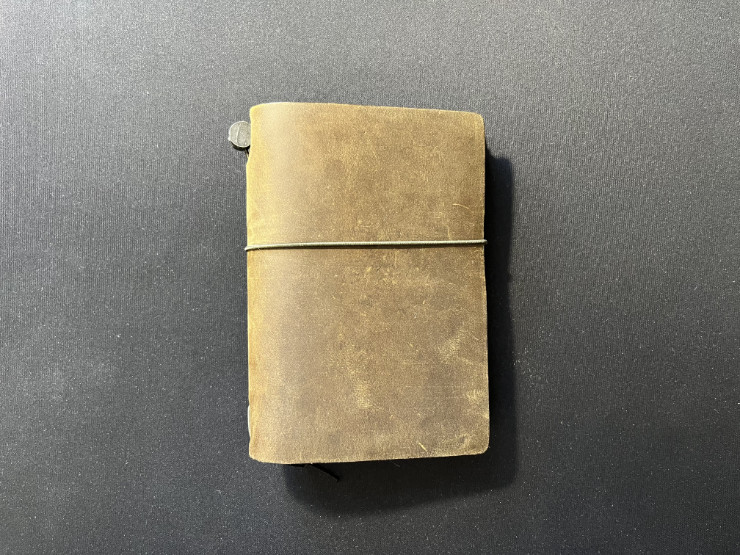
<p><img src="../images/travelers-notebook-passport-size-olive.jpg" alt="travelers-notebook-passport-size-olive" />
<em>My first Traveler’s Notebook, in Passport Size. The leather ages beautifully, showing all tiny scuffs and marks from everyday use.</em></p>

<p>When I learned about the specifics of a traveler’s notebook system, I immediately knew it had potential to vastly improve my experience. Now, instead of taking a couple of heavy hardcover notebooks with me, I could take a single traveler’s notebook with a couple of inserts and be done with it. What is even better, one can easily swap inserts in a couple of seconds, so I could adjust the content of the traveler’s notebook depending on what I am doing or where I am travelling.</p>

<p>However, switching to a traveler’s notebook system can be quite expensive. There are many brands of traveler’s notebooks, with different notebook format, inserts and, most of all, prices. After a careful deliberation, supported by watching a dozen of hours of reviews, I decided to go with the original Traveler’s Notebook<sup id="fnref:fn1"><a href="#fn:fn1" class="footnote" rel="footnote" role="doc-noteref">1</a></sup>, created originally by Midori, presently by The Traveler’s Company. It is a Japan company that has a fairly big experience in stationery and high quality paper. Their notebook was the most pleasing aesthetically, plus the closing rubber band was mounted at the centre of the back cover, what I actually <em>prefer</em> to the mounting point at the spine, prevalent in most of other brands.</p>

<p>I did not want to instantly abandon my old approach to note taking before making sure the traveler’s notebook system is right for me. Therefore I started with a Traveler’s Company Traveler’s Notebook in a so-called “Passport Size”. As the name suggest, the notebook is just big enough for you to safely store your passport inside. I bought a couple of different inserts in this size, acting as separate notebooks for various topics, while I still maintained my regular A5 notebook for the important things, like work, maintenance, etc. It allowed me to test the Traveler’s Notebook without any pressure, as I could always fall back to the original notebooks.</p>

<p>I had been using Traveler’s Notebook Passport Size for three months before I determined that indeed, this is the right solution to my problems. Since then I have also bought a so-called Regular Size Traveler’s Notebook, with dimensions of approximately 1/3 of an A4 sheet of paper. In the weeks to come I plan to gradually move all my note taking to specific notebooks (refills) in my Traveler’s Notebooks, both Regular and Passport Size.</p>

<p>Stay tuned, I will write more about Traveler’s Notebook in the future.</p>

<p><em>This is article no. 13 from the <a href="../tags/100daystooffload/">100 Days To Offload</a> series.</em></p>

<div class="footnotes" role="doc-endnotes">
  <ol>
    <li id="fn:fn1">
      <p>I use small letters, as in <em>traveler’s notebook</em>, when I write about this notebook and refill-binding system in general, and capital letters, as in <em>Traveler’s Notebook</em>, when writing about a specific product from The Traveler’s Company. <a href="#fnref:fn1" class="reversefootnote" role="doc-backlink">&#8617;</a></p>
    </li>
  </ol>
</div>]]></content><author><name>Kamil Leziak</name></author><category term="writing" /><category term="travelersnotebook" /><category term="writing" /><category term="notebook" /><category term="100daystooffload" /><summary type="html"><![CDATA[I may have just found a perfect notebook.]]></summary><media:thumbnail xmlns:media="http://search.yahoo.com/mrss/" url="https://leziak.com/images/travelers-notebook-passport-size-olive.jpg" /><media:content medium="image" url="https://leziak.com/images/travelers-notebook-passport-size-olive.jpg" xmlns:media="http://search.yahoo.com/mrss/" /></entry><entry><title type="html">Hogwarts Legacy: the final battle</title><link href="https://leziak.com/hogwarts-legacy-final-battle/" rel="alternate" type="text/html" title="Hogwarts Legacy: the final battle" /><published>2024-06-25T11:48:14+02:00</published><updated>2024-06-25T11:48:14+02:00</updated><id>https://leziak.com/hogwarts-legacy-final-battle</id><content type="html" xml:base="https://leziak.com/hogwarts-legacy-final-battle/"><![CDATA[<p>As all good things must end eventually, so did my Hogwarts adventure. I have completed the game together with all the quests, achievements and collectibles. Has my opinion on it changed in the meantime? <!--more--> The short answer is no, I still consider Hogwarts Legacy to be an excellent title, not only for Harry Potter fans, but for everyone who wants to feel a bit of magic in their lives.</p>

<p>I must say I haven’t approached the end game in an ordinary way. In the middle of my play I have focused mostly on aquiring the achievements related to collectibles. I was exploring the entire map looking for new Merlin Trials, baloons to pop while airborne, astronomical tables to use, etc. It was fun and exciting experience, because I never knew what I would encounter: a new enemy? Undiscovered place? A riddle to solve? I put many hours into finding all the collectibles, getting the achievements and so on. As a result, when I had nothing left to do but the final quest of the game, I was already at level 39, out of 40 maximum levels available in the game, with most of the revelant perks maxed out, fully upgraded armour and four sets of spells on quick draw. I was more than ready to face Ranrok.</p>

<p>The final quest and the final battle with Ranrok was pleasingly unsurprising: it tested my magic skills, ability to cast different spells in rapid succession, dodge and reposition myself, use elixirs and magic plants—yet none of that was particularly difficult, complicated or frustrating. This is <em>exactly</em> how end game battles should feel most times. Maybe I’m simply too old, or maybe I value my time a little too much, but I no longer feel the pressure to try and punish myself with the highest difficulty level and sweat for hours, trying to defeat the final boss, only to get killed numerous times. In Hogwarts Legacy the balance of the difficulty and weight of the final battle with Ranrok, contrasted with player’s abilities to match the game requirements for speed and dexterity, is perfect, at least on normal difficulty mode. It was not trivial to defeat Ranrok, but it was also not annoyingly difficult. When the battle was over I still had a solid part of my magical supplies left.</p>

<p>One thing I wish Hogwarts Legacy’s developers could change, is the ability to reach the maximum level <em>before</em> the main fight. I was trying hard to do this, but it turned out to be impossible. To reach level 40 one needs to complete all achievements, and one of them can only be completed upon finishing a side quest <em>after</em> the main battle. Unfortunately, this happens quite often in many games: the final level, or the best armour, or the best weapon can often be obtained only so late in the gameplay, those upgrades are no longer useful, because most battles are over by then. The Witcher 1 is a good example of such strategy.</p>

<p>What Hogwarts Legacy did right, though, was the ability to continue the exploration of the game world even after the main plotline is finished. Although I’ve spent dozens of hours immersing myself in the Hogwarts universe, I have not reached a point when I could said “I’m done, I don’t want to see Hogwarts anymore”. I love to, every now and then, load the game and fly around the Hogwarts on my broom, or to play with magical creatures I saved and gave shelter to, or simply to walk through castle’s corridors at night, observing moving portraits, ghosts and other wonders.</p>

<p>I can honestly say that Hogwarts Legacy is the best game I have played in the last year.  I do not know if there is a sequel planned (although I would be really surprised if it weren’t—the game was a global hit), but once Hogwarts Legacy 2 is released, I will gladly return to this magical world.</p>

<p><em>This is article no. 12 from the <a href="../tags/100daystooffload/">100 Days To Offload</a> series.</em></p>]]></content><author><name>Kamil Leziak</name></author><category term="games" /><category term="hogwartslegacy" /><category term="harrypotter" /><category term="nintendoswitch" /><category term="100daystooffload" /><summary type="html"><![CDATA[As all good things must end eventually, so did my Hogwarts adventure. I have completed the game together with all the quests, achievements and collectibles. Has my opinion on it changed in the meantime?]]></summary></entry><entry><title type="html">Kaweco BRASS Sport — the smallest and possibly the coolest fountain pen I own</title><link href="https://leziak.com/kaweco-brass-sport-fountain-pen-review/" rel="alternate" type="text/html" title="Kaweco BRASS Sport — the smallest and possibly the coolest fountain pen I own" /><published>2024-03-19T08:48:26+01:00</published><updated>2024-03-19T08:48:26+01:00</updated><id>https://leziak.com/kaweco-brass-sport-fountain-pen-review</id><content type="html" xml:base="https://leziak.com/kaweco-brass-sport-fountain-pen-review/"><![CDATA[<p>At the beginning of 2024 I acquired a new fountain pen, Kaweco BRASS Sport. I have been looking at it for quite some time, pondering whether it was worth purchasing. In the first week of January I finally decided to check that pen out. Here is my review after two and a half months of usage. <!--more--></p>

<p>When I opened the box my first thought was “this is a <em>really small</em> pen!”. I knew it was small, but seeing it firsthand, I was still surprised by its minuscule size. The size, however, goes in pair with quite a substantial weight, thanks, of course, to the solid brass casing. Closed, the fountain pen has a length of 107 millimetres, but once uncapped and posted, it converts to 135 millimetres, which is more conservative in size. Kaweco BRASS Sport weights 48 grams. In comparison, full-sized Aurora Talentum GT, my everyday carry, weights 34 grams. The bigger weight of Kaweco is a good think, though, because it makes a small pen easier to handle. It is also reassuring when I carry it in my pocket, because I know right away that it is with me and I have not lost it.</p>

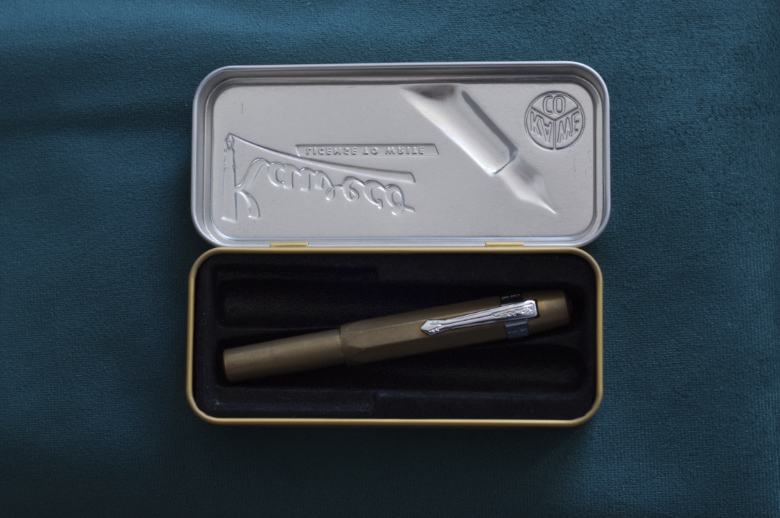
<p>Together with the Kaweco BRASS Sport one gets a metal box, which has a black plastic mould inside, which allows to carry up to two Kaweco Sports in a parallel configuration, or a single pen in either a diagonal or straight configuration. It is a nice touch because the box can act as a sturdy case. Not that the fountain pen made of brass requires delicate treatment - on the contrary, it is impressively robust and almost indestructible. I only have one Kaweco Sport now, but in the future I want to get one of each metal collection, that is STEEL, AL and BRONZE versions.</p>

<p><img src="../images/kaweco_brass_sport_case.jpg" alt="kaweco_brass_sport_case" />
<em>The metal box can hold up to two Kaweco Sport pens of any type.</em></p>
<p>In the box we receive a rectangular black sticker with Kaweco logo, as well as a tiny brochure featuring the most important dates in Kaweco’s history, labelled in both German and English (although English translation is not error-free). The metal box is further enclosed in a cardboard sleeve, with sleeve’s outer surface lacquered in black, with white and grey lettering. I appreciate the multi-layered packaging of the fountain pen, offering both enhanced protection as well as serving as a proof of manufacturer’s care. I definitely will be using the metal case in the future, especially once I get another Kaweco Sport. One final addition is a single blue ink cartridge, in an international short size.</p>

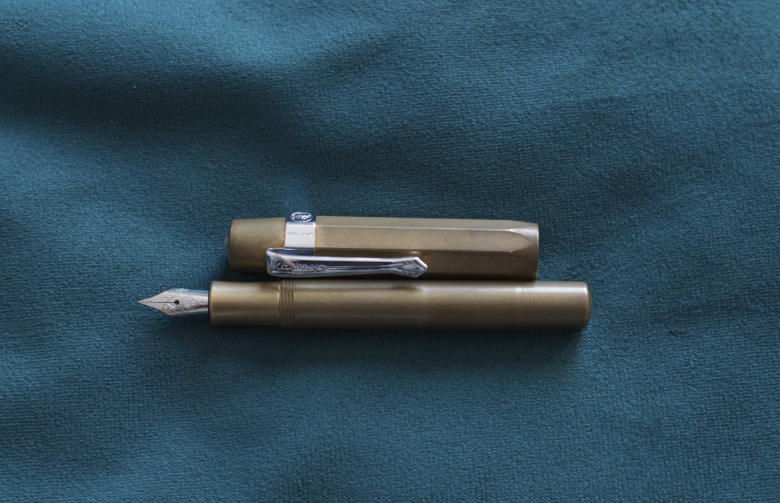
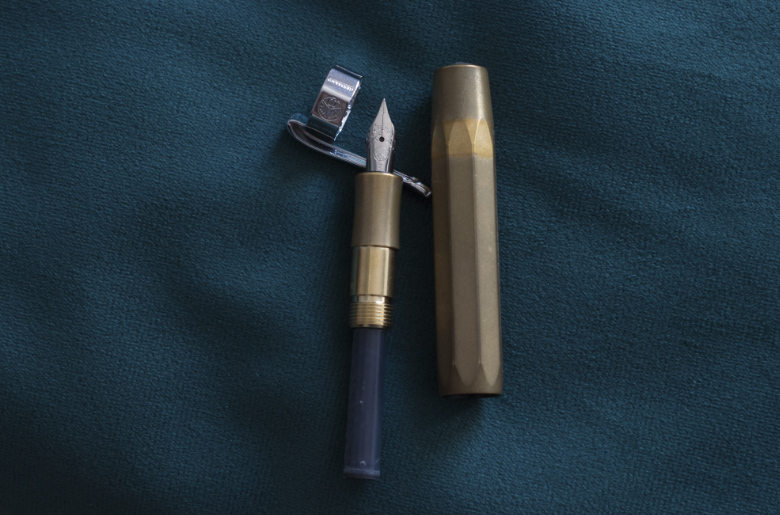
<p>Initially, I was surprised to discover that Kaweco does not include a clip with Kaweco Sport fountain pen, but the reason soon became obvious. Due to pen’s size and portability, some people may prefer to not use a clip at all, as not to add additional bulk to the otherwise slim and sleek design. And for those who cannot imagine using a clip-less fountain pen, Kaweco offers a choice of four (!) colours, to combine with any Kaweco Sport as they please. I went for a chrome finish clip, which matches the colour of a steel nib.</p>

<p><img src="../images/kaweco_brass_sport_opened.jpg" alt="kaweco_brass_sport_opened" />
<em>Kaweco Sport does not come with a clip, but one can choose to buy one separately. They are available in four colours: chrome, gold, black and bronze. The chrome one nicely matches the standard steel nib</em></p>
<p>I have also bought a mini converter, to allow for use of bottled ink. However, I have been using ink cartridges so far, mostly because the capacity of the ink converter turned out to be diminutive. I was surprised to see the converter being so small. It holds even less ink than a regular short cartridge, yet it looks like it is of a good quality and sturdy. It should work well for a long time. It is a classic piston converter with a plastic plunge and a rubber seal. The end looks like a standard international receptacle.</p>

<p>When I was reading opinions about Kaweco BRASS Sport, many people had complained about a characteristic smell of metal lingering on their hands after using the brass pen. In my particular case the smell of brass is faint and unobtrusive. It is closest to the smell of a coin. It lingers on a hand slightly, but is only noticeable to me when I stick my palm just under my nose. Washing my hands with a regular soap gets rid of it easily. It should be noted, however, that since the above-mentioned smell is a product of metal staying in contact with skin oils, it is possible that both the intensity and duration of the smell would vary from person to person.</p>

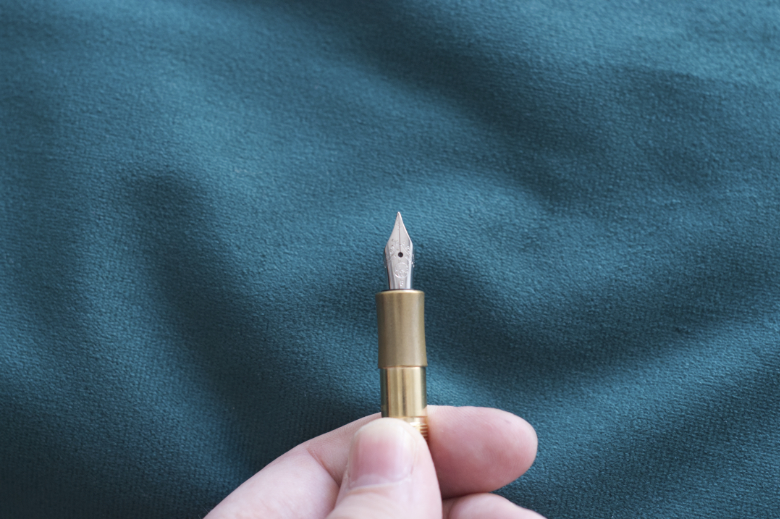
<p>Regarding the nib, I use a regular Kaweco Steel F nib, although one can swap it really easily with a gold-coated version or a different size. The nib is robust and works well regardless of time spent unused. The ink does not dry out in a capped pen, but the nib experiences occasional dry starts. There is no skipping or scratching, though. The width of a line produced by an F nib is approximately 0.3-0.4 millimetre, and there is virtually no variation in line width, which is consistent with a steel, non-flexible nib.</p>

<p><img src="../images/kaweco_brass_sport_nib.jpg" alt="kaweco_brass_sport_nib" />
<em>The regular steel nib is nothing fancy, but it is reliable and robust enough, despite some dry starts every now and then</em></p>
<p>I have some pens with nibs that write nicer, although I would be afraid to use them in a situation when I need to scribe something down hastily, for the fear of applying too much pressure and deforming the nib. In that regard a steel nib of Kaweco Sport resembles a regular pen in terms of its resistance and usability. This reaffirms that Kaweco BRASS Sport is a perfect fountain pen for everyday carry.</p>

<p>After purchasing Kaweco BRASS Sport I found myself carrying a fountain pen much more often than before, due to its pocket size and toughness. This brass pen is incredibly robust. I have always worried about accidentally damaging my fountain pens when carrying them casually in a pocket, and this pen has absolutely removed my fear. I have a feeling that I could let a tank drive over it and the pen would still be functional.</p>

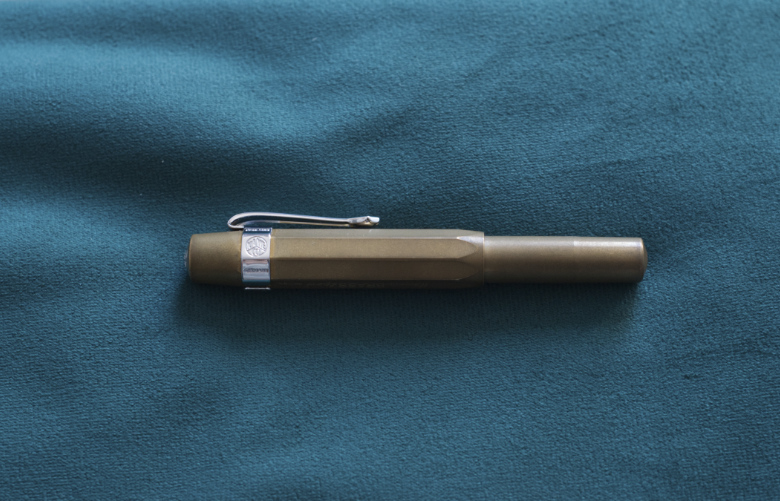
<p>I was surprised to observe how quickly the patina developed on brass and how dark it is. It was a matter of a couple of days, at most, and I were not even using the pen all that much. I store my fountain pens in a natural leather roll case, so maybe that was a factor in catalysing the patina development. Interestingly, there are few places where patina has not developed yet, mostly near the clip and its mount. It allows me to compare the original look of the fountain pen out of the box with its current tone. I preferred the raw, initial look of brass without the patina, mostly because the patina made brass look duller and noticeably darker.</p>

<p><img src="../images/kaweco_brass_sport_patina.jpg" alt="kaweco_brass_sport_patina" />
<em>I was bewildered by how quickly the patina developed on brass casing, and how dull it made it look in comparison to the original shine</em></p>
<p>When writing for longer periods of time (an hour or so) the weight of the fountain pen may tire one’s hand quicker than a lighter, ebonite or aluminium pen. The solution is to simply un-post the pen and put the cap away. It makes Kaweco BRASS Sport half as heavy but also half as long, which may be another important factor in ergonomics. Nevertheless, I found this fountain pen to be a good choice regardless of its weight.</p>

<p><img src="../images/kaweco_brass_sport_closed.jpg" alt="kaweco_brass_sport_closed" />
<em>The robustness and small size of Kaweco BRASS Sport make it a perfect pocket pen for everyday carry</em></p>

<p>In general, Kaweco BRASS Sport is a perfect everyday pen for me, and I am already looking forward to expanding my collection with the bronze version. Of course, should I purchase Kaweco BRONZE Sport, I will publish my opinion as well.</p>

<h3 id="yay">Yay!</h3>
<ul>
  <li>durability</li>
  <li>brass finish</li>
  <li>portability</li>
</ul>

<h3 id="nay">Nay!</h3>
<ul>
  <li>patina makes the pen look dull</li>
  <li>slight smell of coins</li>
  <li>may be tiring to use in very long session when posted</li>
</ul>

<h3 id="overall-summary-in-three-words">Overall summary in three words:</h3>
<p><strong>interesting, unique, pocketable</strong></p>

<p><em>This is article no. 11 from the <a href="../tags/100daystooffload/">100 Days To Offload</a> series.</em></p>]]></content><author><name>Kamil Leziak</name></author><category term="writing" /><category term="fountainpen" /><category term="handwriting" /><category term="writing" /><category term="kaweco" /><category term="100daystooffload" /><summary type="html"><![CDATA[At the beginning of 2024 I acquired a new fountain pen, Kaweco BRASS Sport. I have been looking at it for quite some time, pondering whether it was worth purchasing. In the first week of January I finally decided to check that pen out. Here is my review after two and a half months of usage.]]></summary><media:thumbnail xmlns:media="http://search.yahoo.com/mrss/" url="https://leziak.com/images/kaweco_brass_sport_case.jpg" /><media:content medium="image" url="https://leziak.com/images/kaweco_brass_sport_case.jpg" xmlns:media="http://search.yahoo.com/mrss/" /></entry><entry><title type="html">13 years on deviantART</title><link href="https://leziak.com/13-years-deviantart/" rel="alternate" type="text/html" title="13 years on deviantART" /><published>2024-02-06T08:22:53+01:00</published><updated>2024-02-06T08:22:53+01:00</updated><id>https://leziak.com/13th-deviantart-anniversary</id><content type="html" xml:base="https://leziak.com/13-years-deviantart/"><![CDATA[<p>This morning I was surprised by a message from deviantART, stating “Happy Anniversary, vertiser!”<!--more--></p>

<p><img src="../images/deviantart_13th_anniversary.png" alt="deviantart" /></p>

<blockquote>
  <p>vertiser, you’ve been a deviant for 13 years!
Here’s to another year of creativity and inspiration.</p>
</blockquote>

<p>Apparently I created an account on deviantart.com on the 6th of February 2011. I must admit I only remember the year, not the exact date, and if not for that e-mail, I would not have guessed that today is my deviantART anniversary. At this moment deviantART is one of the places on the Internet where my presence is the longest. The earliest still active profile is my YouTube account, set up in January 2005.</p>

<p>I had originally joined deviantART in an endeavour to explore the art of photography. 2011 was the year when I upgraded from my compact camera (well, it was Konica Minolta Dimage Z3, so it was not <em>that</em> compact) to a Digital Single-Lens Reflex Camera, namely Nikon D90. It was a huge upgrade for me, basically in every aspect of photography. Better sensor, bigger resolution, a true pentaprism viewfinder instead of a poor electronic one in Minolta. Interchangeable lenses and plethora of accessories, like filters and flashes, made it a wonderful piece of equipment for me.</p>

<p>But I had joined deviantART before I even bought that Nikon. I wanted to see how others work with light, composition, objects and people in order to create an interesting piece of art. DeviantART was like an infinite source of inspiration, curiosity and motivation to expand my knowledge, try out some new ideas, improve the technical aspect of my photographs. With time I made some connections with other members of deviantART community, joined some groups, engaged in discussions and conversations on various topics related to art and photography. DeviantART was a happy place back then.</p>

<p>Unfortunately there were some rather controversial changes in deviantart.com look, features and core aspects. One things that caused the mass exodus of users was the forced change into a new layout, which, in my opinion, has completely destroyed deviantART’s originality, making it just one of hundreds of photo- and art-sharing websites. There were some other changes that followed, which alienated big part of the community even further. Still, there is some magic left in deviantART and its longevity, and perhaps the website will rise again in the future.</p>

<p>I am not an active user of deviantART nowadays, mostly because I do not publish any new photographs or artworks. I hope to return to that website at some point in the future. Perhaps I will be there on my 14th anniversary or maybe sooner? Time will tell.</p>

<p><em>This is article no. 10 from the <a href="../tags/100daystooffload/">100 Days To Offload</a> series.</em></p>]]></content><author><name>Kamil Leziak</name></author><category term="photography" /><category term="art" /><category term="deviantart" /><category term="internet" /><category term="photography" /><category term="art" /><category term="dslr" /><category term="nikon" /><category term="100daystooffload" /><summary type="html"><![CDATA[This morning I was surprised by a message from deviantART, stating “Happy Anniversary, vertiser!”]]></summary><media:thumbnail xmlns:media="http://search.yahoo.com/mrss/" url="https://leziak.com/images/deviantart_13th_anniversary.png" /><media:content medium="image" url="https://leziak.com/images/deviantart_13th_anniversary.png" xmlns:media="http://search.yahoo.com/mrss/" /></entry><entry><title type="html">Hogwarts Legacy in the middle of the adventure</title><link href="https://leziak.com/hogwarts-legacy-middle-adventure/" rel="alternate" type="text/html" title="Hogwarts Legacy in the middle of the adventure" /><published>2024-02-05T10:19:22+01:00</published><updated>2024-02-05T10:19:22+01:00</updated><id>https://leziak.com/hogwarts-legacy-middle-of-the-adventure</id><content type="html" xml:base="https://leziak.com/hogwarts-legacy-middle-adventure/"><![CDATA[<p>I have been playing Hogwarts Legacy for some time now and have advanced in the story and the discovery of game’s world. After putting about 20-25 hours in the game I can say that the magical world is more and more fascinating with every hour spent within. <!--more--></p>

<p>I have enjoyed the world created for the game from the very beginning. It was not entirely unknown to me, as I have been a fan of Harry Potter books since my late childhood. I know how Hogwarts was presented in movies, how it is depicted in books, but being able to explore the castle myself is an entirely new experience. It is obvious that developers spent many hours crafting the world that is both homogenous with cinematic source material and captivating for players. Hogwarts Legacy makes me want to lose myself in the world of magic and wonder, providing an immersive experience that is entertaining for both adults and children alike. There were many occasions on which I have been casually exploring my surroundings, looking for floating keys, magical creatures or simply enjoying the magnificent view, instead of progressing the main mission or a side quest.</p>

<p>This is a huge plus of Hogwarts Legacy: it allows one to choose their own adventure and play the game their way. There are days when I am focusing on a certain mission, or learning a new spell. On other days I can wander around, looking for magical plants to replenish my supplies needed for crafting potions. There are some days when I am focused on acquiring certain collectibles or discovering new locations to use the <a href="https://harrypotter.fandom.com/wiki/Floo_powder">floo powder</a> to teleport to. My playstyle varies from day to day but regardless, Hogwarts Legacy is always an enjoyable and entertaining title.</p>

<p>I am playing Hogwarts Legacy on Nintendo Switch and while I am aware that the graphics are inferior to those on PCs or other consoles, I am absolutely satisfied with the visuals delivered. To be honest, Hogwarts Legacy on Nintendo Switch looks <em>better</em> than I expected. Special effects related to magic are attractive and the entire experience is cohesive and well-thought, unlike many Switch ports which make playing on a console frustrating (I am looking at you, Skyrim). There are some occasional glitches or stutters, especially when lighting changes due to weather or time of the day, but they do not impact the experience and do not break the immersion. User interface and controls are quite intuitive, although changing spells casted during fights requires some practise. I should also mention the music and sound effects, which greatly enhance the experience. I am playing in docked mode only but I suppose they would be even more important in hand held mode, when one uses headphones. Speaking of the audio side of the game, I cannot ignore the excellent voice acting for the characters living in the magical world. Everything about Hogwarts Legacy shows developers’ care and attention to details.</p>

<p>Although I am not yet in the middle of the <em>story itself</em> (I would even dare to say I barely scratched the surface of Hogwarts’ world) I can confidently say that this is one of the best games available for Nintendo Switch, and one of the best games I have ever played. I am looking forward to discovering more magical secrets and becoming a true master of wizardy. And I will document my progress along the way.</p>

<p><em>This is article no. 9 from the <a href="../tags/100daystooffload/">100 Days To Offload</a> series.</em></p>]]></content><author><name>Kamil Leziak</name></author><category term="games" /><category term="hogwartslegacy" /><category term="harrypotter" /><category term="nintendoswitch" /><category term="100daystooffload" /><summary type="html"><![CDATA[I have been playing Hogwarts Legacy for some time now and have advanced in the story and the discovery of game’s world. After putting about 20-25 hours in the game I can say that the magical world is more and more fascinating with every hour spent within.]]></summary></entry></feed>